 Tether
Android device control,
wired & wireless.
Tether ADB is an enterprise-grade Android device hub for your desktop. Pair over Wi-Fi with a QR code, mirror and control the screen, tail logcat, run a shell, and manage files & apps — all in one stunning app.
Windows 10/11 (64-bit)v0.1.210 MB installerNo admin required
Everything you need, in one hub
The full adb toolbox with a control center that actually feels good to use.
QR-code wireless pairing
Scan a code and you’re connected. No IP typing, no six-digit codes. Pairing-code and mDNS discovery are there too.
Screen mirror & control
Low-latency mirroring powered by scrcpy, with quality presets, screenshots, and screen recording.
Live logcat
Streaming logs with level coloring and tag/text filters, on a ring buffer that stays fast under heavy output.
Shell
Run adb shell commands with history recall, exit-code badges, and one-tap quick commands.
File manager
Browse the device filesystem — pull, push, rename, delete, and make folders with native dialogs.
App manager
Install, uninstall, launch, stop, clear, enable or disable apps, and pull APKs — with search.
Automation
Port forwards, reverse tunnels, and one-click reboot targets (system, recovery, bootloader, fastboot).
Instant device tracking
Devices appear and disappear the moment they connect over USB or Wi-Fi — no manual refresh.
Pair with a QR code in seconds
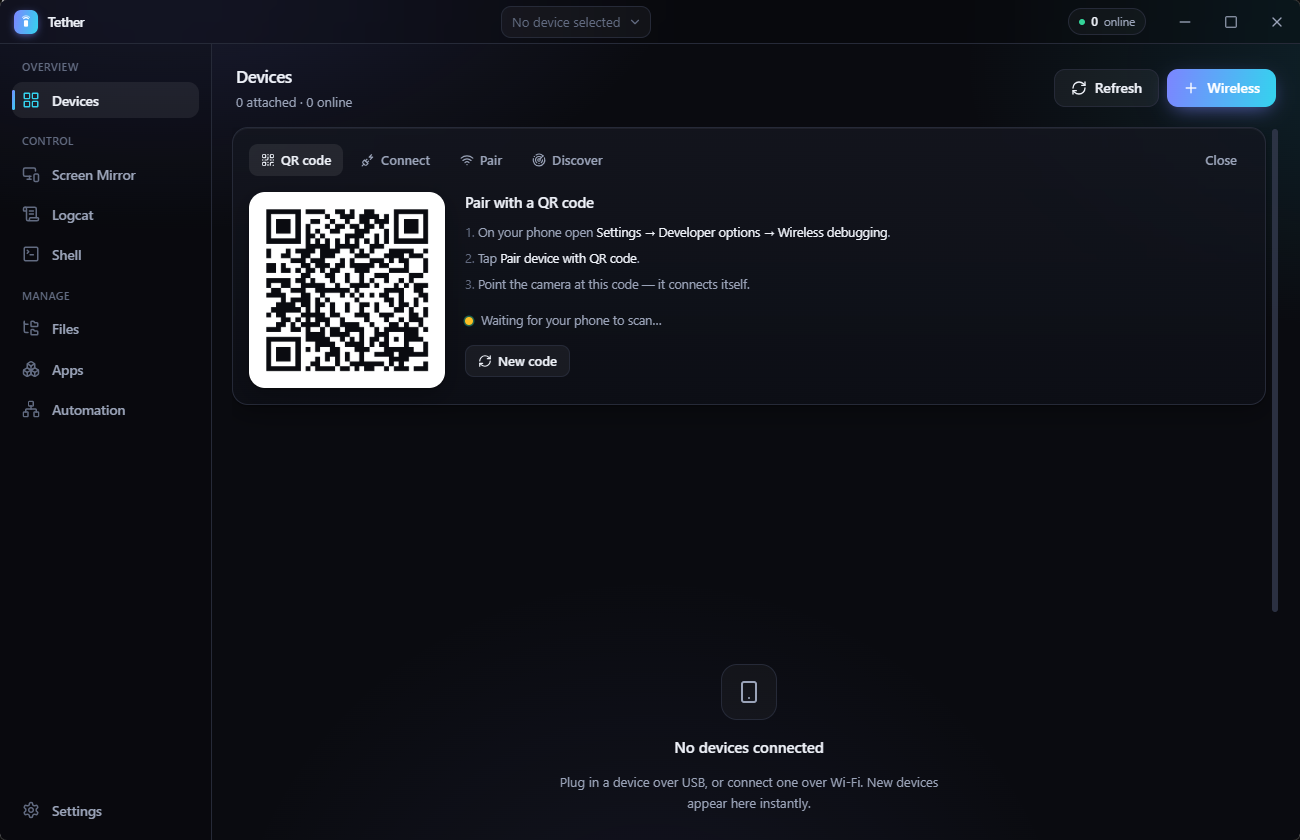
Wireless debugging usually means typing IP addresses and six-digit codes. Tether ADB makes it a scan: point your phone at the code and it connects itself.
- 1
Open the QR tab
In Tether ADB, click Wireless → QR code. A fresh pairing code appears instantly.
- 2
Scan with your phone
On Android: Developer options → Wireless debugging → Pair device with QR code.
- 3
It connects itself
Tether ADB detects your phone over the network and pairs automatically — nothing to type.
Waiting for your phone to scan…
Get Tether ADB
One installer, everything included. Installs per-user with a desktop shortcut and a searchable Start-menu entry — no admin, no SDK.
The installer isn’t code-signed yet, so Windows may show a SmartScreen prompt — click More info → Run anyway. adb and scrcpy are bundled; nothing else to install.
Frequently asked
Do I need to install the Android SDK, adb, or scrcpy?+
No. Tether ADB bundles adb and scrcpy inside the installer, so every feature — including screen mirroring — works out of the box with nothing else to install.
Is Tether ADB free?+
Yes, Tether ADB is free to download and use. It is proprietary software — © Luna Maze, all rights reserved.
Which platforms are supported?+
Tether ADB runs on Windows 10 and 11 (64-bit). It installs per-user with no administrator rights and adds a searchable Start-menu entry and a desktop shortcut.
Why does Windows show a SmartScreen warning?+
The installer is not code-signed yet, so Windows SmartScreen may show a “Windows protected your PC” prompt. Click “More info” then “Run anyway”. Code signing is planned.
How does QR-code wireless pairing work?+
Tether ADB generates an Android-compatible pairing QR. When you scan it from your phone’s Wireless debugging screen, Tether ADB discovers the device on your network and runs the pairing automatically — no codes to type.
Can I use ADB over Wi-Fi without a USB cable?+
Yes. On Android 11 and newer, Wireless debugging lets you pair and connect with no cable at all — scan the QR code in Tether ADB and you are connected. On older devices, plug in once over USB and use “Go wireless”, which switches adb to TCP mode and connects over the network; the cable can then come out.
My phone is stuck on “pairing” forever. How do I fix it?+
That almost always means the pairing request never reached your phone, so nothing ever completed the handshake — retrying against the same screen cannot help, because an Android pairing screen is only good for one attempt. It is usually caused by mDNS discovery failing silently, which is common on Windows machines that have virtual network adapters from VirtualBox, WSL, Hyper-V or a VPN: the discovery query goes out the wrong adapter and the phone is never seen. Tether ADB works around this by doing its own mDNS discovery across every network interface rather than relying on adb’s. If discovery is blocked entirely on your network, use “Pair device with pairing code” on the phone and enter the address and code in Tether ADB’s Pair tab — that path needs no discovery at all.
adb says “Successfully paired” but the device never appears. Why?+
Pairing and connecting are two different steps. “adb pair” only establishes trust between your PC and the phone — the device does not appear in the device list until something connects to its connect endpoint, which listens on a different port from the pairing one. adb normally does that itself using mDNS discovery, so when discovery fails you get a successful pairing and no device anywhere. Tether ADB connects for you after pairing, and tells you exactly what to do if it cannot find the endpoint.
Wireless debugging shows nothing / “adb mdns services” is empty. Does Tether ADB still work?+
Yes. adb’s bundled mDNS discovery is unreliable on Windows — it can return an empty list while your phone is plainly advertising, and its daemon sometimes dies outright with “mdns daemon unavailable”. Tether ADB browses mDNS itself on every network interface instead of trusting adb, and its built-in Connection Troubleshooter shows you exactly what is on the wire: adb health, the live discovery backend, every endpoint found, and a real reachability probe with latency for each.
Is there a GUI for scrcpy?+
Yes — Tether ADB is a full graphical front-end for both adb and scrcpy, with scrcpy bundled. You get low-latency screen mirroring and control with quality presets, plus screenshots and screen recording, without touching a command line or installing anything else.